The sales CRM built for Automation Texting Calling Emailing WhatsApp Support Revenue generation

Capture every lead, keep conversations and next actions on the record, and move opportunities from first touch to revenue.

No credit card required Built for growing teams

See how the sales workflow runs
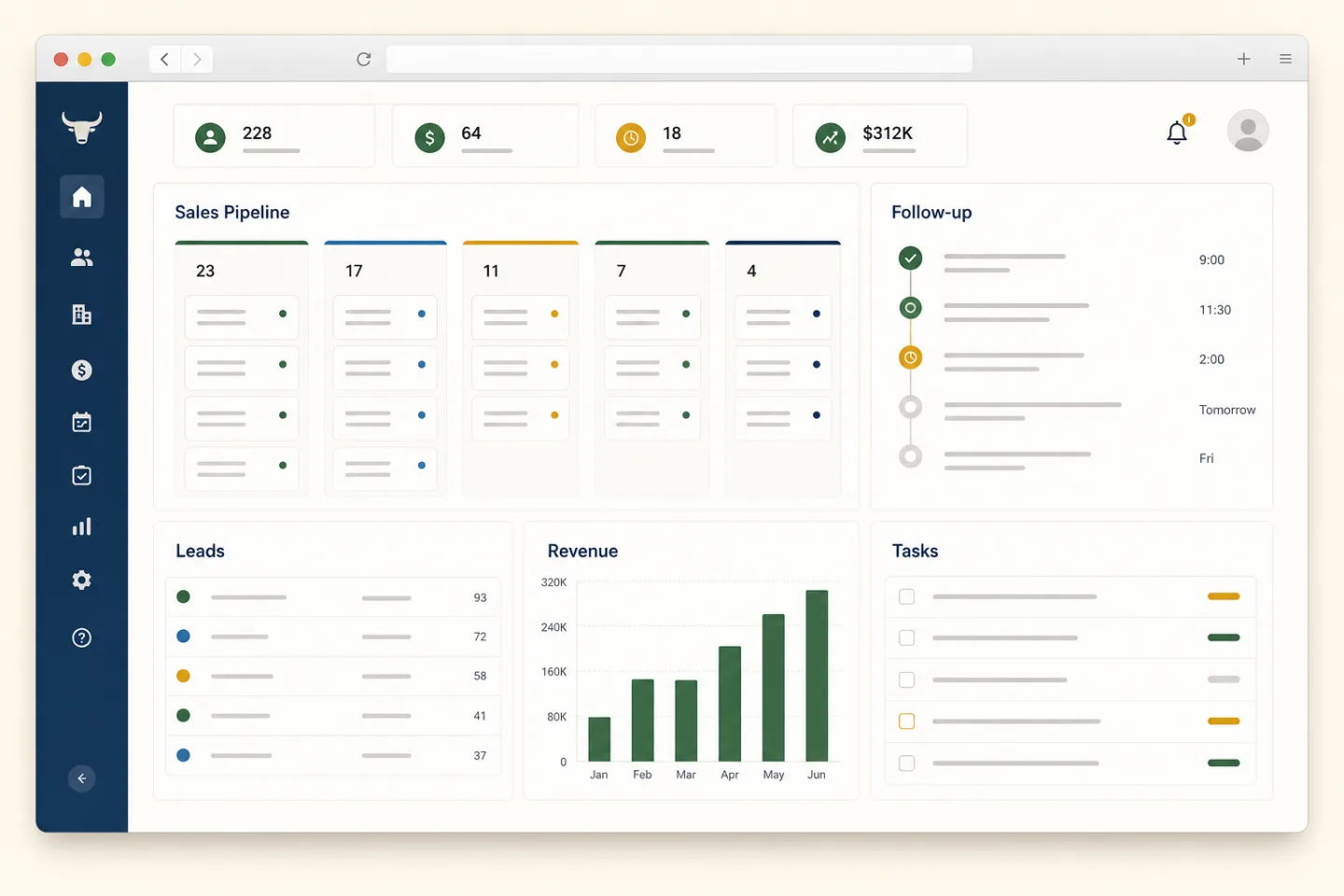
CRM workspace showing a sales pipeline, lead list, follow-up timeline, revenue chart, and task queue
Pipeline visibility Next-action queue Revenue tracking
Works with the tools you already use
Google Microsoft Slack Stripe Zapier

Modular

Enable only the products your team needs.

Secure

Roles, permissions, and audit logs by default.

Fast to launch

Go live in minutes — not months.

Growth checkpoint

Why businesses outgrow their CRM

As pipelines, channels, and teams expand, yesterday’s CRM becomes the bottleneck. BullCRM is built for the next stage—clear workflows, smarter automation, and a workspace that stays fast as you scale.

Scale without the slowdown

More users, records, and products should not mean slower screens or brittle admin. Grow capacity while keeping daily work responsive.

Automation that closes loops

Route leads, nudge follow-ups, and keep handoffs on the record—so work moves even when the inbox is full.

AI with a clear job

Summarize context, surface priorities, and draft next steps—then let people review before anything goes out.

Collaboration in one thread

Sales, marketing, and support share the same customer timeline—ownership, notes, and next actions stay visible.

Reporting you can act on

Pipeline health, conversion, and activity stay tied to live records—not exports that go stale overnight.

Integrations that stick

Connect email, chat, calendars, and the tools you already run—without losing the customer in another tab.

Customize without complexity

Shape fields, stages, and products to match how your team sells—turn modules on only when they earn a place.

Secure and easy to use

Roles, permissions, and audit trails by default—with a workspace that feels fast enough for everyday selling.

Self-check

10 signs your CRM is costing you sales

Common friction points that slow pipelines and quietly drain revenue.

Too many manual tasks

Reps copy data between tools, update stages by hand, and lose hours before the next call.

Slow follow-ups

Hot leads cool while reminders live in inboxes instead of on the record.

No AI assistance

Every summary, prioritization, and next-step draft still starts from a blank screen.

Poor reporting

Forecasts and conversion answers require exports, spreadsheets, and weekend cleanup.

No WhatsApp in the CRM

Customer chats happen elsewhere, so context never lands on the opportunity.

Hard onboarding

New hires need weeks of training before they can run a clean pipeline day.

Limited automation

Routing, nudges, and handoffs still depend on someone remembering the process.

Scattered customer data

Notes, emails, and deal history live in separate places—so teams sell without the full story.

Poor integrations

Calendar, inbox, and chat tools stay siloed, creating duplicate work and missed signals.

Growing software costs

Extra seats, add-ons, and workaround tools pile up while win rates stay flat.

1 10

Ready for a cleaner path from lead to close?

See how BullCRM solves these challenges.
Focused by design

A CRM for the work your team actually does

Many CRMs ask teams to navigate features they never use. BullCRM keeps daily work clear, lets you add products only when they earn a place, and uses AI where it can improve a decision or remove repeat work.

  • Only what your team needs

    Enable products as work changes. Unused tools stay out of the daily workflow.

  • AI with a clear job

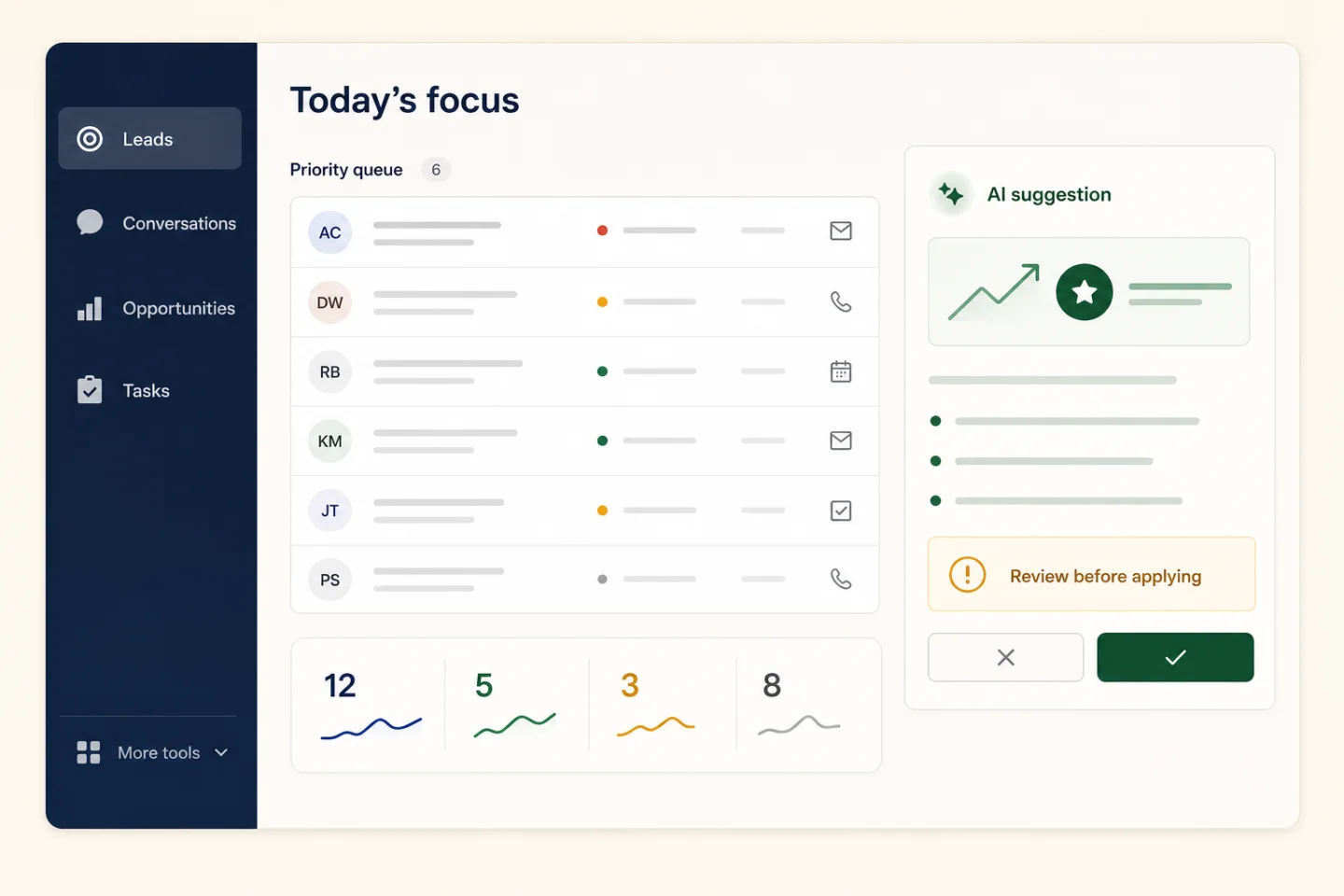
    Surface priorities, summarize context, and draft the next step—then let a person review.

  • Results stay visible

    Connect every suggestion and action to owners, conversations, opportunities, and revenue.
See how BullCRM uses AI
Focused CRM workspace showing essential sales modules, a priority queue, and a human-reviewed AI suggestion
AI assists with the next decision. Your team stays in control.
Sales workflow

Follow every lead from first signal to booked revenue

Each stage keeps context, ownership, and the next action on the same record.

01 Capture & qualify

Turn inbound interest into an owned sales conversation

Bring web forms, campaigns, WhatsApp enquiries, imports, and manual leads into one queue. Score fit and assign the right owner while interest is fresh.
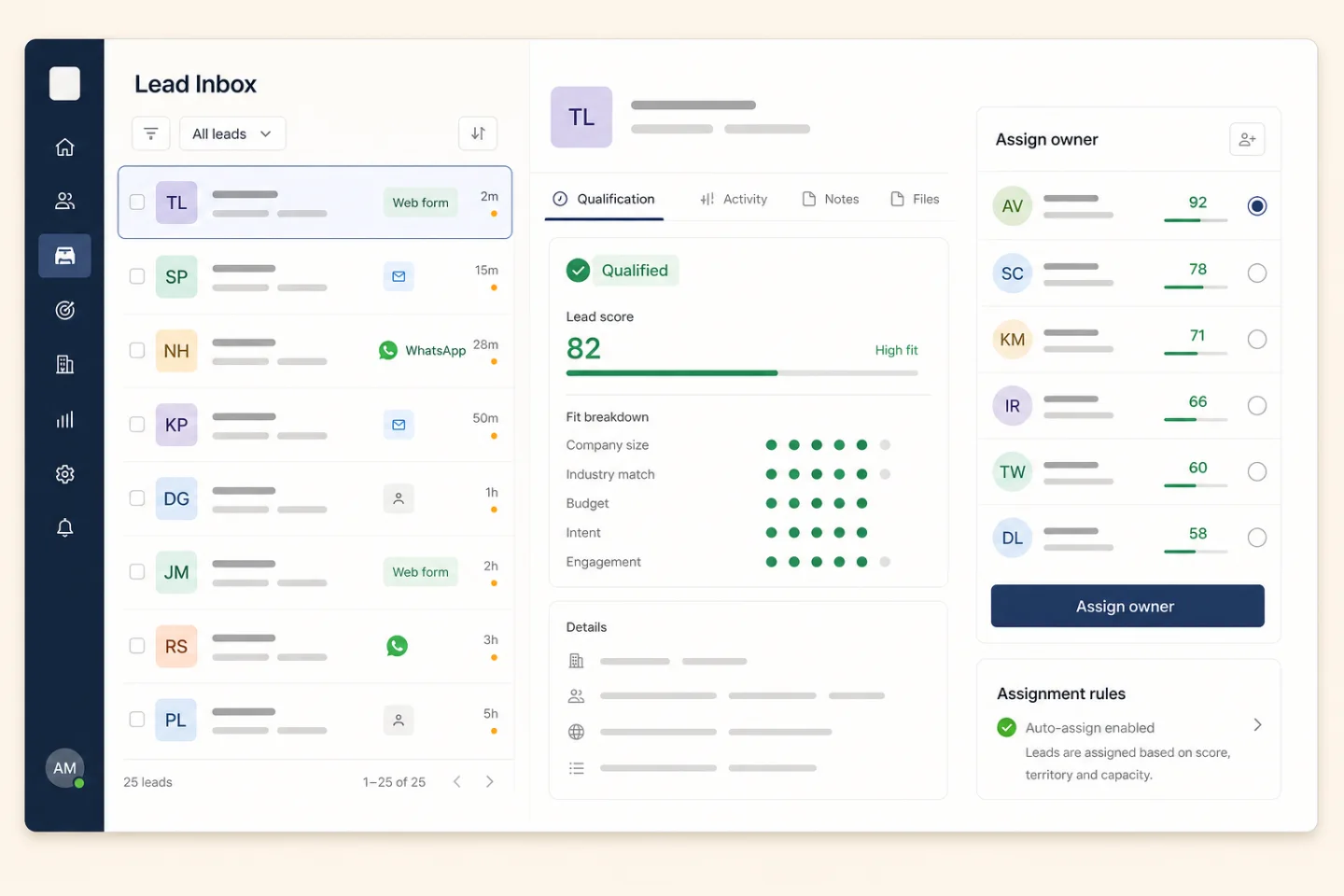
  • Keep the original source on the lead
  • Prioritize by fit, intent, and engagement
  • Route by territory, team, or capacity
Lead inbox showing source, qualification score, and sales owner assignment
Source, score, and ownership stay visible together.
02 Automation

Run follow-up without chasing the checklist

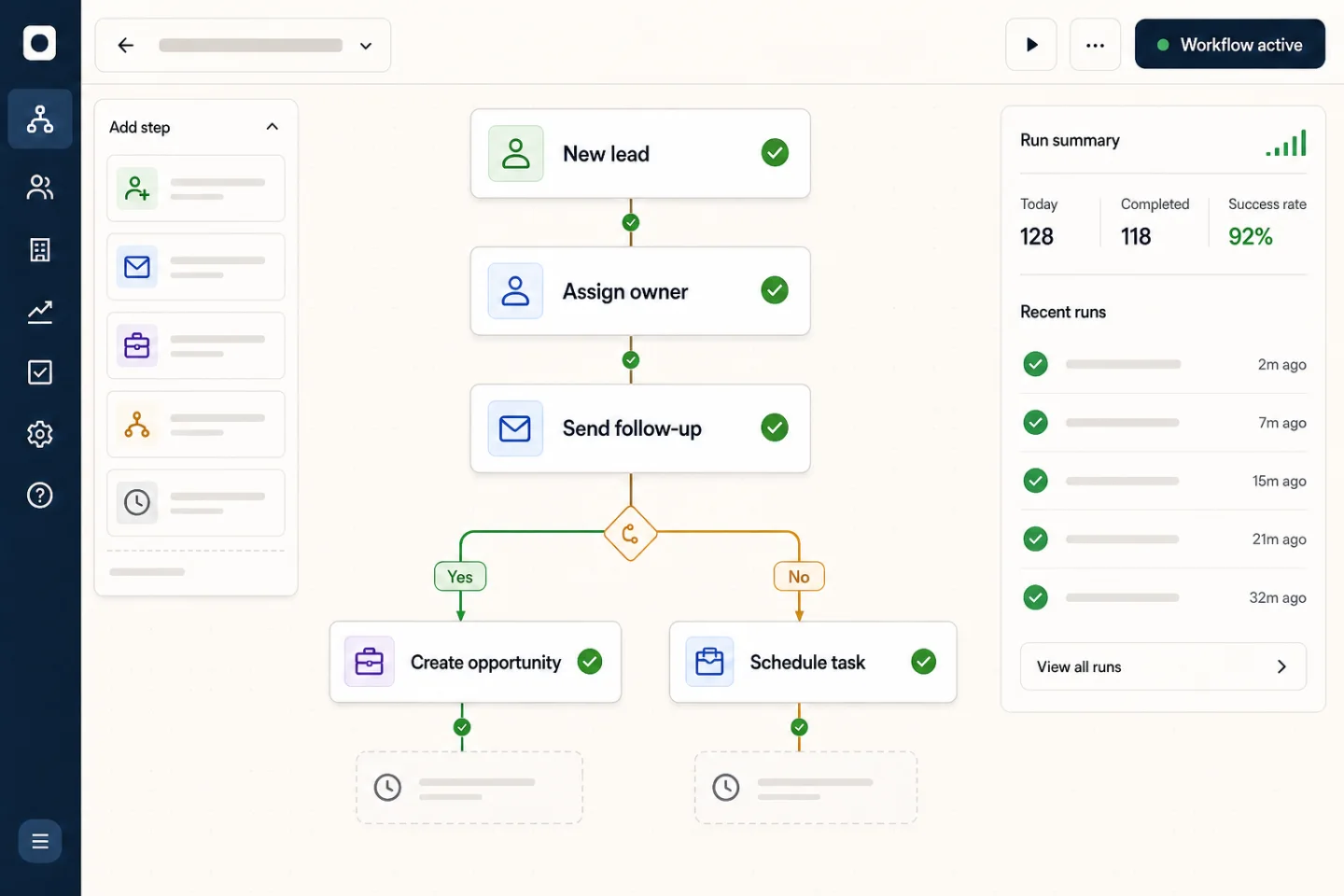
Use triggers, conditions, and actions to keep response times consistent while your team stays in control.

Assign the owner, send the first response, and create the opportunity.

Workflow builder assigning a new lead, sending follow-up, and creating an opportunity
Build repeatable sales actions without code.
03 Opportunities

Give every possible sale a next step and an accountable owner

Track status, value type, confidence, expected revenue, opportunity tags, and the next activity without losing the lead history.

  • Shape stages around the way your team sells
  • Surface deals with no next activity
  • Keep confidence and expected revenue current
Explore opportunity management
Qualification3
Website enquiryNext: discovery call₹1.8L
Regional expansionNext: assign owner₹3.2L
Discovery2
Annual renewalNext: requirements₹4.6L
Support expansionNext: product demo₹2.4L
Proposal2
Multi-team rolloutNext: review quote₹7.5L
Won1
CRM migrationHandoff ready₹5.8L
04 Connected context

Keep the complete customer conversation on the record

Link email, WhatsApp, calls, meetings, notes, and tasks to the right lead or account so the next rep never starts cold.
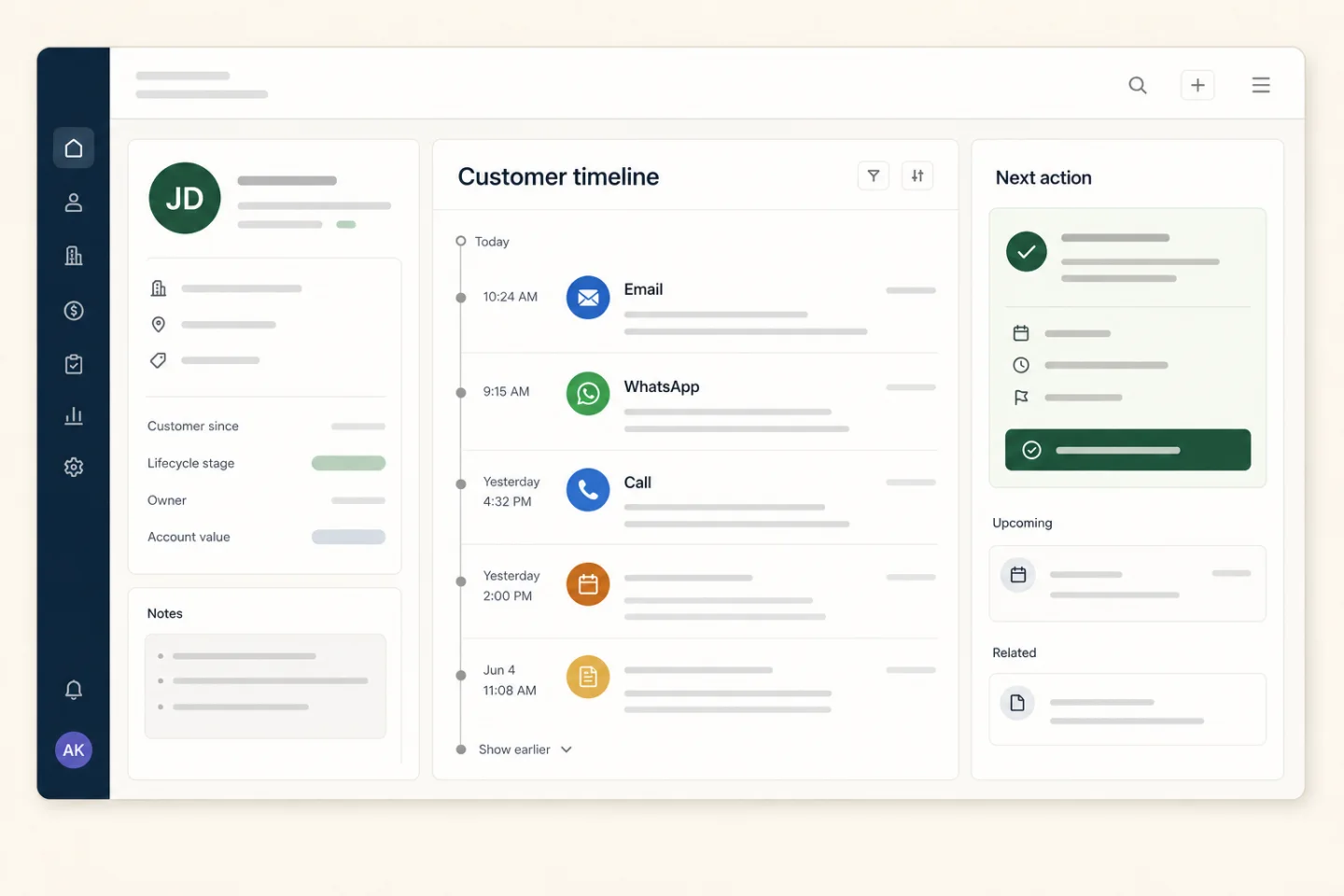
  • Review the customer timeline before every call
  • See commitments and decisions beside the record
  • Schedule the next action while context is fresh
Customer timeline combining email, WhatsApp, calls, notes, and the next action
Every conversation supports the next action.
05 Forecast & handoff

Forecast revenue, then hand won work to delivery

See expected revenue and confidence by opportunity, then pass the complete deal context to projects and finance.
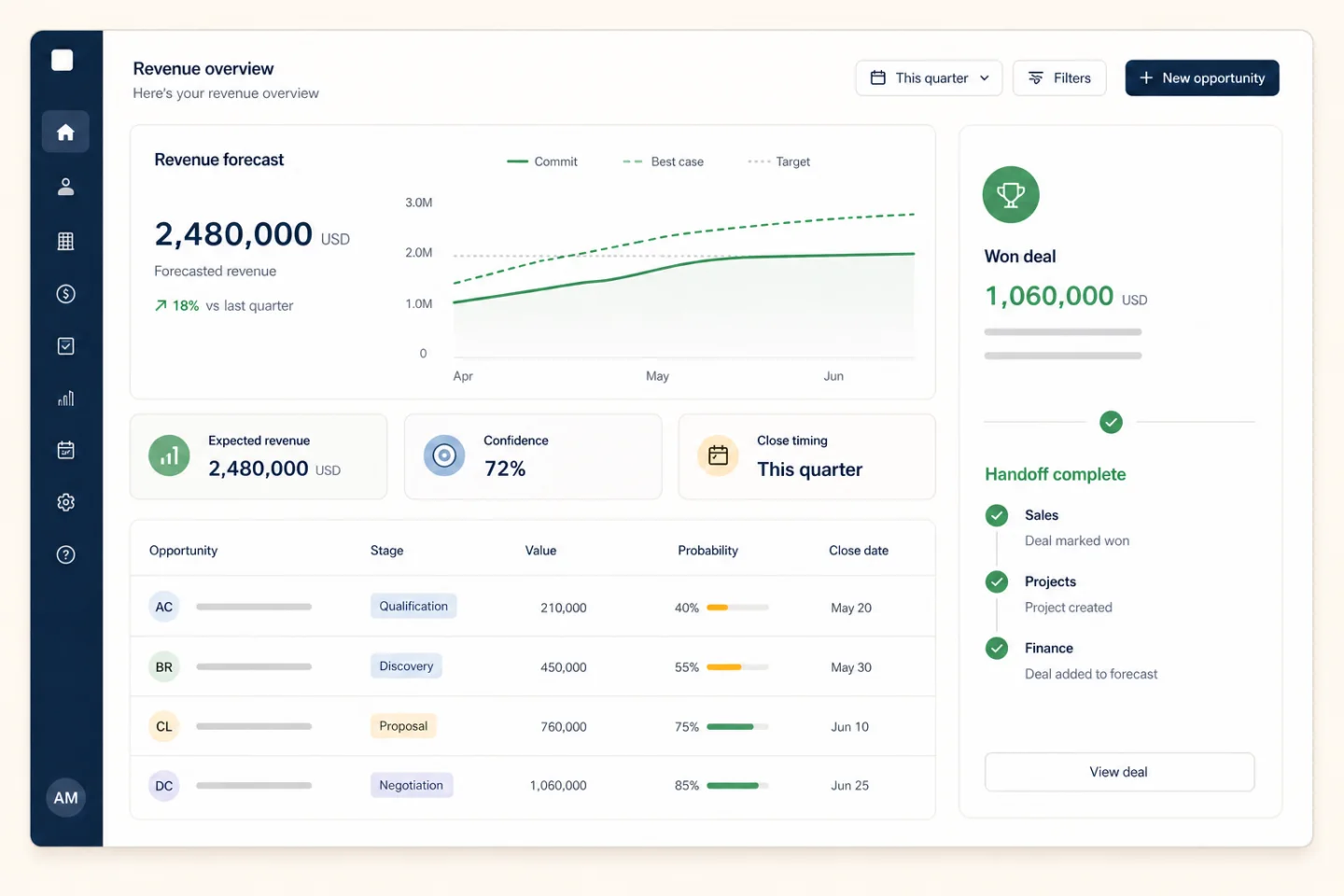

  • Review pipeline value and close timing
  • Identify gaps before the forecast meeting
  • Create delivery and finance work after a win
Revenue forecast showing expected revenue, deal confidence, and completed project and finance handoff
Move from forecast to delivery without re-entering the deal.
Sales team reviewing their customer pipeline and next actions together
Daily sales work

Turn every CRM record into a clear next step

Keep ownership, conversations, opportunity value, and follow-up work together so every rep knows what happened and what comes next.

  • Qualify and assign new enquiries
  • Review the complete customer timeline
  • Move opportunities through each sales stage
  • Schedule the next call, meeting, or reminder
  • Hand won work to projects and finance with context
Secure by design

Controlled access and accountability.

Roles, permissions, audit logs, and validation-first workflows keep your data safe.

Roles & permissions

Control who can view, create, edit, and delete across each module.

Activity logs

Track changes and events across the platform.

Secure by default

Built with secure defaults and validation-first workflows.

Fast UX

Search, filters, and quick actions to keep teams moving.

10
Products ready
99.9%
Platform uptime
50%
Faster onboarding
24/7
Monitoring
Customers

Trusted by teams that move fast.

A clean UI, consistent permissions, and modular workflows help teams adopt faster.

“Setup was straightforward and our team was productive immediately. We replaced three tools with BullCRM.”
RM
Rohan MehtaOperations Manager, Northwind
“We unified campaigns and lead follow-ups without adding complexity. The module model just clicks.”
SK
Sasha KimSales Lead, Voltline
“Permissions and audit logs give us confidence to scale. Finance and HR live alongside CRM.”
AB
Aisha BrownCOO, Evergreen
FAQ

Answers before you ask.

Can we enable only the products we need?

Yes — BullCRM is designed around products. Turn them on or off at any time.

Is access controlled per team and role?

Roles and permissions ensure users see only what they’re allowed to see and do across every module.

Where do leads come from?

Leads can be created manually, captured via web forms, generated through campaigns, or triggered by SalesBot.

How does BullCRM keep data safe?

Secure defaults, validation-first workflows, audit logs, and role-based access across every module.

Can I cancel anytime?

Yes. Plans are monthly or yearly, with no hidden fees and no lock-ins.

Free trial

Start your free trial with BullCRM

Fill out the form below and we’ll help you get started quickly.